

CHalo For Claude
Welcome to explore CHalo, a groundbreaking, imaginative new Agent platform. Let’s take you through its features.
*Services not available to users in mainland China due to regulatory restrictions.

WELCOME
TO
CHalo
CHalo is a desktop application built on the Claude Agent SDK. It isn't just a chat window — every conversation is a working agent that can read and write files, run commands, use your tools, and get things done on your machine, while you watch each step and stay in control.
What you can do with it
Have Claude do the work, not just describe it.Ask for a task and CHalo carries it out — editing files, running commands, searching your project. File changes show up as clean, readable diffs, and long sequences of activity collapse into a single line you can expand when you want the details.
Decide how much freedom it gets.Pick a mode next to the model selector and change it any time: approve every sensitive action one by one, let it edit files freely, or let it run on its own. When it asks for permission, you see exactly what it wants to do and why — and you can decline with a reason it will take into account.
Work on several things at once.Conversations keep running in the background, so you can start one task, switch to another, and come back to a finished answer. Type a follow-up while Claude is still working and it will be picked up mid-task instead of waiting until the end.
Keep it in the loop with your setup.Choose the model, adjust how deeply it thinks, connect MCP tools, add skills, and edit the memory files that shape how it behaves — all from the app, no config files required.
Pick it back up from your phone. Turn on remote access and open CHalo in a phone browser on the same network: it's the same conversation, live — same progress, same approval prompts. Start something at your desk and keep steering it from the couch.
Comfortable to live in.Light and dark themes, English and 简体中文, images you can paste straight into the message box, copy buttons where you expect them, and a layout that works from a wide desktop window down to a phone screen.
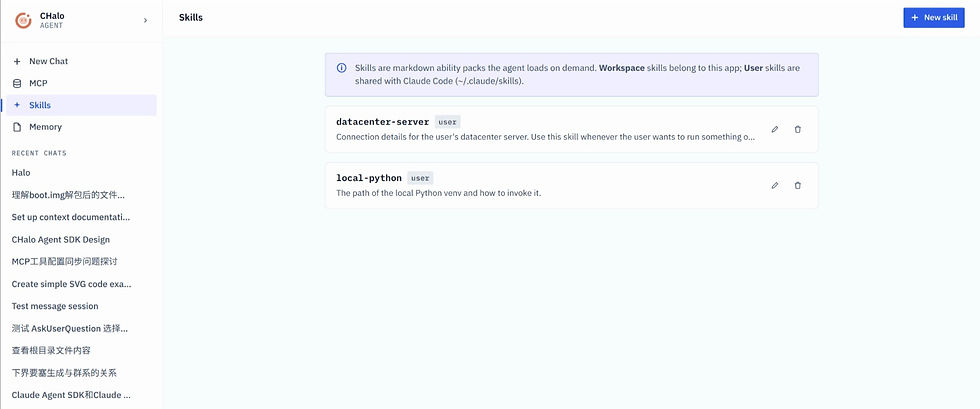
Introduction for Skills & MCP Module
Skills & MCP
Skills are Markdown‑based capability packs loaded on‑demand by the agent.
• Workspace skills apply only within CHalo.
• User skills live in ~/.claude/skills and are shared with Claude‑Code.
Create, edit or delete skills via the UI. Pre‑configured skills store server connection info and local Python environment settings for automatic agent reference.
MCP is the integration gateway for external tools, services and hardware.
Difference:
• Skills: enhance agent knowledge & behavioral rules.
• MCP: supply real executable tool interfaces.
Skills guide when/how tools are used; MCP provides the actual tool endpoints.

All Memory
Memory stores persistent instructions inside CLAUDE.md, automatically injected into every chat session.
• Workspace memory: Applies only to CHalo, stored locally within the application config folder.
• User memory: Saved at ~/.claude/CLAUDE.md, shared with Claude‑Code across tools.
Write facts, rules and preferences here for the agent to follow consistently. Click Save to take effect.

Dark mode
Start new agent‑powered conversations. Set your Working Directory — the agent reads and writes files within this folder.
The directory locks once you send your first message. You may change path or set it as default for future chats.
Supports image paste, permission‑mode switching and background task execution.
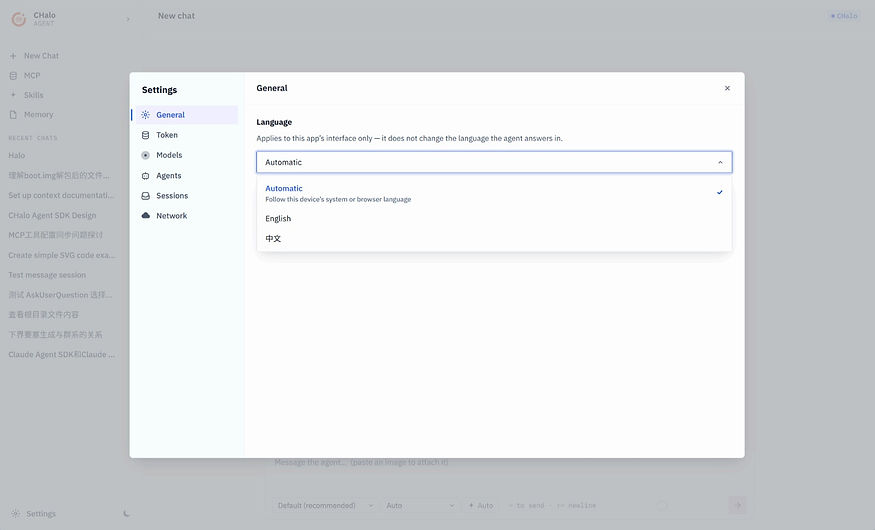
Settings‑General · Multilingual UI
Adjust app display language: Auto (system‑followed), English, 中文.
This setting only affects UI text; it does not control the agent’s output language.

Settings‑Sessions · Local Chat Session Scanner
Manages directories for loading local chat histories.
Use Scan all sessions to discover hidden conversations stored in listed folders.
Chats created by other app instances remain invisible until scanned. Claude‑Code sessions will not appear here.

Settings‑Network · Remote Access
Enable HTTP‑based remote control. Devices on your LAN (phone, other PC) can connect and interact with ongoing conversations live.
Access scope options: This computer only / Local network.

Get CHalo
Services not available to users in mainland China due to regulatory restrictions.
Powered By MATRIX
©Copyright KARL'S LIGHT CO.LTD All rights reserved. Designed by KARL‘S LIGHT in Guiyang
© 2026 CHalo · Designed, planned and developed by Yuan Yiwei
Services not available to users in mainland China due to regulatory restrictions.